

Reviewed by Anthony Perry, CPCU, high-net-worth risk management specialist at PCRG Insurance. Last updated October 2026.
When a Familiar Voice Isn’t Who You Think It Is
Imagine your phone rings, and it’s your son. He’s panicked, he’s been in an accident abroad, and he needs money wired today. The voice is his, and so is the nickname he uses for you. But it isn’t him.
Scams like this now target wealthy families every day. The good news is that a few simple habits stop most of them. This guide explains how criminals target high-net-worth households, the warning signs to watch for, and the practical steps that protect your family, your money, and your privacy.
Key Takeaways: Cybersecurity for High-Net-Worth Families
- Criminals often go after the people around you, such as children, aging parents, and household staff, not just you.
- AI can now copy a loved one’s voice, so a familiar voice is no longer proof of identity.
- A family code word and a “call back to verify” rule stop most impersonation and wire fraud scams.
- Your smart home, cars, and online footprint are all part of your security.
- Security lowers your risk, and the right insurance covers what still gets through.
Why Do Cybercriminals Target High-Net-Worth Families?
Wealthy families offer bigger payoffs and more ways in. More accounts, homes, staff, advisors, and connected devices mean more doors a criminal can try.
The losses are growing fast. Americans reported nearly $21 billion in losses to cyber-enabled crime in 2025, across more than a million complaints to the FBI. And criminals rarely start with a direct attack. They research first, piecing together your family from property records, social media, news coverage, and data broker sites. With that picture, a stranger can sound like someone you know.
What Are the Biggest Cyber Threats to High-Net-Worth Families?
The most common threats are phishing, impersonation, wire fraud, account takeover, and ransomware. AI-powered voice scams are the fastest-growing new risk. Let’s go over what each looks like for a family like yours.
Phishing and Social Engineering
Phishing uses a fake email, text, or call to trick you into clicking a link, sharing a password, or sending money. It’s the most reported cybercrime in America, accounting for about 19% of all complaints to the FBI in 2025. Messages aimed at wealthy families are often tailored, mentioning a real advisor, property, or upcoming trip.
AI Voice Cloning and Deepfake Scams
Criminals can now copy a person’s voice from a short video clip and use it on a live phone call. The FBI began tracking AI-related crime in 2025 and received more than 22,000 complaints tied to over $893 million in losses. Deepfake video calls impersonating executives and family members are also rising.
Wire Fraud and Payment Redirection
A criminal poses as your attorney, title company, or advisor and sends “updated” payment instructions. The money goes to their account instead. This scheme, called business email compromise, caused about $3 billion in reported losses in 2025. Home closings, tuition payments, and capital calls are common targets.
Account Takeover and Identity Theft
Criminals use stolen or reused passwords to break into email, bank, or brokerage accounts. Your email account matters most, because it can reset nearly every other password you have.
Ransomware and Malware
Malicious software can lock your files or quietly steal information until a ransom is paid. It usually arrives through an email attachment, a fake download, or an unpatched device.
Public Wi-Fi and Network Attacks
Hotel, airport, and café networks can be spoofed or monitored. On the road, use your phone’s hotspot or a trusted VPN instead of public Wi-Fi.
Smart Home and Connected Device Attacks
Cameras, locks, and other smart devices with weak passwords or old software can give strangers a view into your home or a foothold on your network.
How Can You Tell If Someone Is Targeting Your Family?
Watch for strangers who know too much, requests that feel rushed, and messages from familiar people that arrive in unfamiliar ways. One odd interaction doesn’t mean you’re a target. A pattern does.
What Are the Warning Signs Someone Is Gathering Information About You?
Be cautious when someone:
- Asks detailed questions about your family, homes, travel, or finances that the conversation doesn’t require.
- Tries repeatedly to connect with you or your staff online.
- Asks you to “confirm” details they already seem to know.
- Mentions something you never told them but may have posted publicly.
If this happens, don’t confirm anything. End the conversation politely, then verify who they are through a source you already trust.
How Can You Tell If Someone Is Impersonating a Person You Trust?
The biggest red flag is a familiar person contacting you in an unfamiliar way. Watch for:
- A new phone number or email address.
- A request to move to a different app or channel.
- Urgency or secrecy (“don’t tell anyone”).
- A request for money, passwords, or an exception to normal procedures.
- Wording that doesn’t sound like them.
When in doubt, hang up and call the person back at a number you already have.
Can Scammers Clone My Voice to Trick My Family?
Yes. A few seconds of audio from a social media video, podcast, or voicemail greeting can be enough to create a convincing copy. That’s why a familiar voice alone should never authorize a payment or a password reset. The fix is simple: agree on a family code word, and always verify urgent requests with a callback.
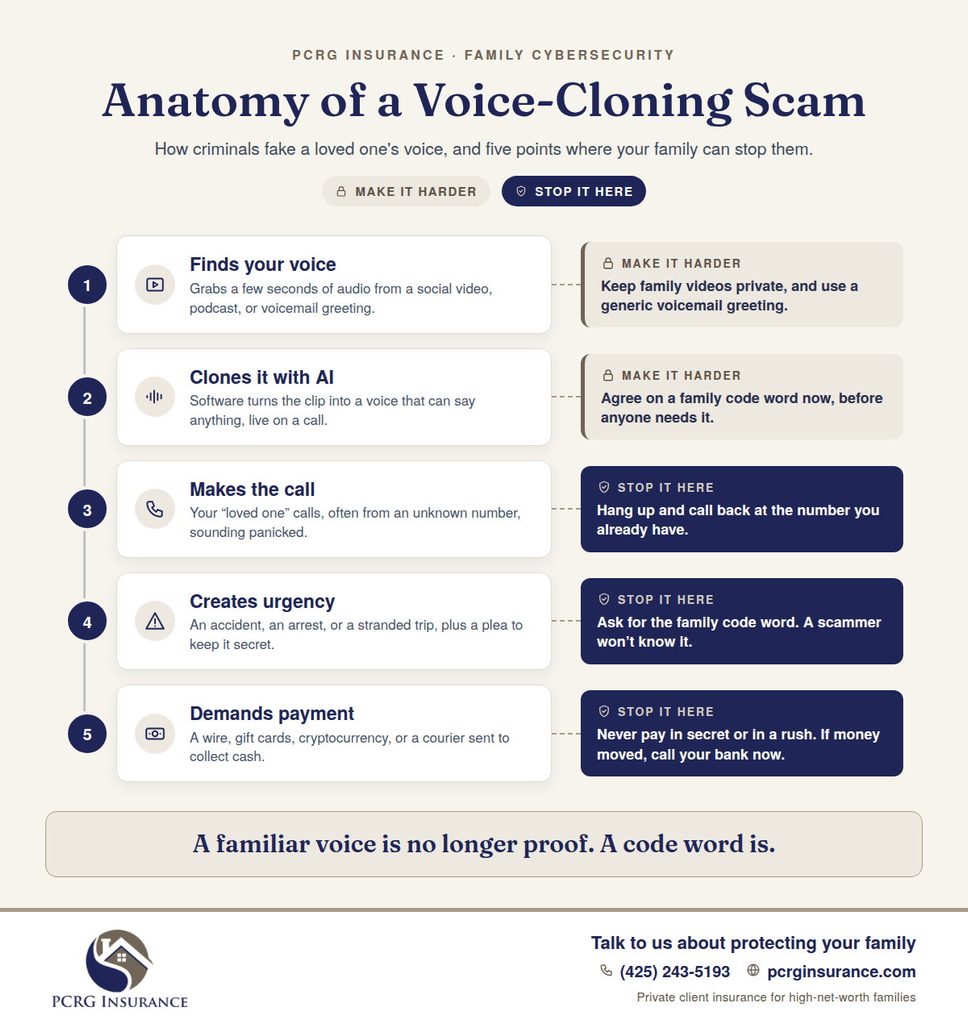
What Makes a Good Family Code Word?
A good code word is easy to remember, impossible to guess, and never posted online. Avoid pet names, birthdays, and anything in your social media history. Two random, unrelated words work well, such as “copper lantern.” Share it only with immediate family and trusted staff, in person. Change it if you think someone else has learned it.
Treat the code word as one extra check, not the only one. For money or sensitive information, still verify through a second channel.
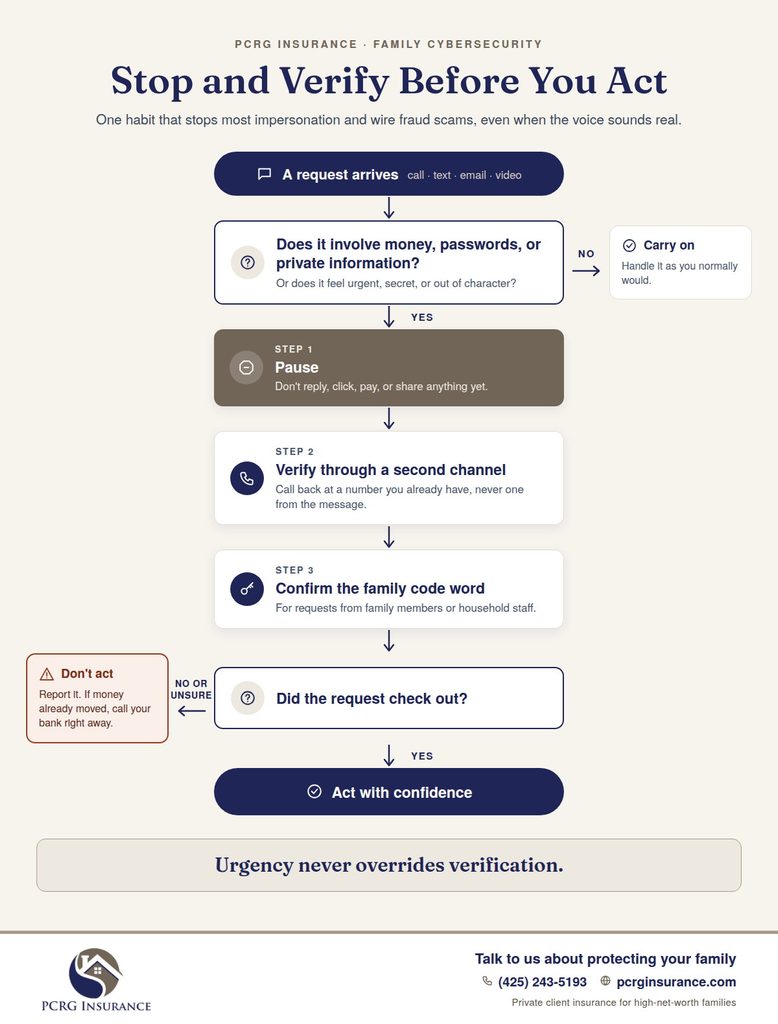
When Should an Urgent Request Make You Stop and Verify?
Every time it involves money, account access, sensitive information, or a change to normal procedures. Criminals use urgency, authority, and fear because pressure stops people from checking.
Set one rule for everyone in your household: urgency never overrides verification. A real family member or advisor will understand a five-minute delay. A scammer won’t want one.
How Can You Protect Your Family’s Accounts and Money?
Lock down email and financial accounts first, then add verification rules for anything that moves money.
How Should You Secure Your Most Important Accounts?
Start with email, banking, investment, and cloud storage accounts:
- Use a unique password for each one, stored in a reputable password manager.
- Turn on multifactor authentication (MFA), ideally with an authenticator app or security key instead of text messages.
- Remove old phone numbers, email addresses, and devices from your account recovery settings.
- Review login activity every few months.
How Can You Prevent Wire Fraud and Payment Scams?
Put these rules in writing for family, staff, and your family office:
- Never act on payment instructions received only by email or text.
- Confirm any new or changed instructions by calling a known number, not one in the message.
- For large transfers, require approval from a second person.
- Tell your bank, attorney, and advisors about your verification process so they expect it.
Should You Freeze Your Family’s Credit?
For most families, yes. A credit freeze stops anyone from opening new credit in your name. It’s free at all three bureaus (Equifax, Experian, and TransUnion), and you can lift it temporarily when you need to apply for credit. Parents can also freeze credit for children under 16, a common and often overlooked target of identity theft.
How Can You Secure a Smart Home?
Treat every connected device as a door into your home network. Use strong, unique passwords, update software regularly, and separate smart devices from the computers and phones that hold sensitive information.
Can Someone Watch You Through Your Home Security Cameras?
Yes, if the camera account is poorly protected. Most camera breaches happen through reused passwords, not sophisticated hacking. To protect yourself:
- Use a unique password and MFA on every camera account.
- Check the app’s list of shared users, and remove anyone who shouldn’t have access, such as former staff.
- Keep camera firmware updated.
- Avoid placing indoor cameras in bedrooms and bathrooms, and use privacy mode when you’re home.
How Do You Secure Your Home Wi-Fi Network?
Change the router’s default admin password, use WPA3 or WPA2 encryption, and keep the router’s firmware updated. Turn off features you don’t use, such as remote management. Every few months, review the list of connected devices and remove anything you don’t recognize.
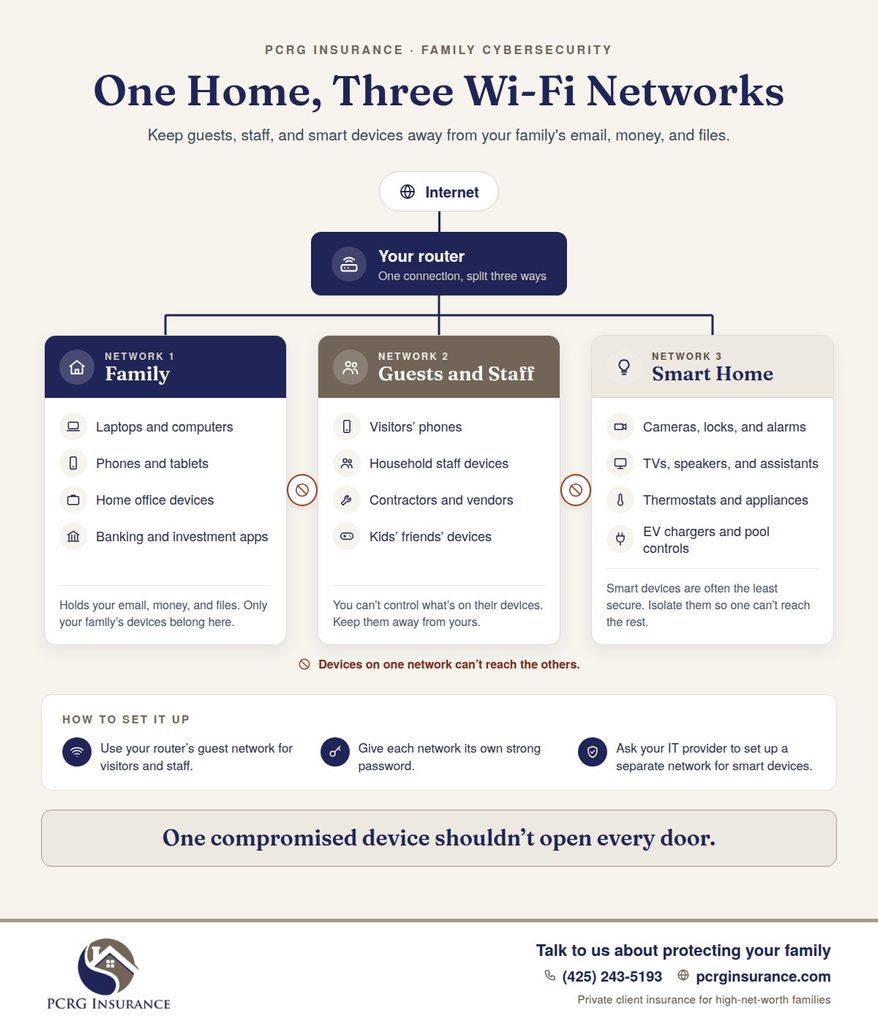
Should Household Staff and Guests Use Your Home Wi-Fi?
They should use a separate guest network, not your main one. Ideally, create three networks: one for your family’s computers and phones, one for guests and staff, and one for smart devices. That way, a compromised guest phone or smart TV can’t reach your personal files.
What Other Connected Devices Create Security Risks?
Smart TVs, voice assistants, baby monitors, printers, pool and irrigation controls, and entertainment systems all connect to your network. Keep an inventory of every device across all your homes, change default passwords, and remove devices you no longer use. Families with several properties or large smart home systems benefit most from a written inventory.
Can Your Car Be Hacked or Tracked?
Connected cars can reveal your location and routines if their apps and accounts are exposed. Remote hacking of a car’s driving systems is rare. The more common risk is someone accessing the car’s app or placing a tracking device on it.
How Do You Protect a Connected Car’s App and Account?
Secure the vehicle app with a unique password and MFA. Review which drivers and devices have access, and remove former staff or old phones. Before selling a car, remove your account, paired phones, and saved addresses. If you ever get an “unknown tracker” alert on your phone, take it seriously.
Are Driver-Assistance and Self-Driving Features a Cyber Risk?
These features rely on software, sensors, and connectivity, so updates matter. Install manufacturer updates promptly, and remember that driver-assistance systems still require your attention. The main privacy concern is the data these systems collect, such as location history and driving patterns.
Is a Home EV Charger a Security Risk?
A connected charger is another device on your network, with its own app and often stored payment information. Secure its account like any other, install updates, and put it on your smart device network rather than your main one.
How Can You Protect Children, Aging Parents, and Household Staff?
The people around you are often the easiest way in. Short, practical training and clear rules protect them, and they protect you.
How Do You Teach Children to Stay Safe Online?
Teach children three rules: don’t share the family’s locations, travel plans, school, or home details online; don’t click links or accept friend requests from strangers; and verify any unusual message, even one that seems to come from Mom, Dad, or a friend. Make sure they know the family code word, and that they can always come to you without getting in trouble.
How Can You Protect Aging Parents From Scam Calls?
Older Americans are hit hardest. People over 60 reported about $7.7 billion in losses in 2025, a 59% increase over the year before. To help:
- Share the family code word with them.
- Turn on call screening on their phones.
- Ask their bank and brokerage to add you as a trusted contact.
- Remind them often that no real family member or company will ever demand gift cards, cryptocurrency, or secrecy.
How Should Household Employees Be Trained in Cybersecurity?
Staff who manage your calendar, home systems, or payments need basic training in spotting phishing and impersonation. Give each person only the access their role requires, and use confidentiality agreements. Remove access the same day someone leaves. Most importantly, make sure staff know they will never be penalized for pausing to verify a request, even one that seems to come from you.
How Do You Secure Family Office Access?
Use individual accounts instead of shared logins, require MFA, and limit access to what each role needs. Keep a current list of every employee, advisor, and vendor who can reach financial systems or documents, and review it whenever someone’s role changes.
How Can You Reduce Your Family’s Digital Footprint?
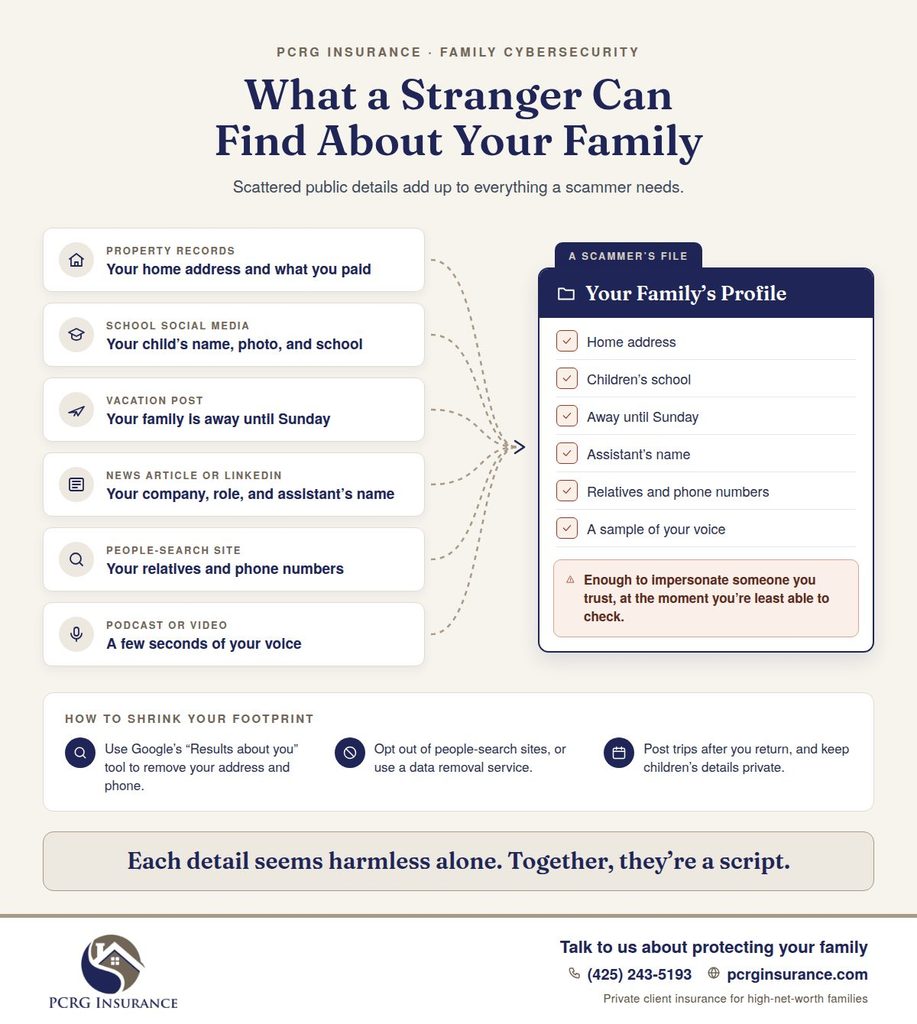
Search your family members’ names and see what a stranger could find. Then remove what doesn’t need to be public, and stop sharing what reveals too much.
How Do You Remove Your Home Address From Google and People-Search Sites?
Start with Google’s “Results about you” tool, which lets you request removal of search results showing your home address, phone number, or email. Next, submit opt-out requests to people-search and data broker sites. There are dozens, and many relist information over time, so plan to repeat the process regularly.
Is It Safe to Post Vacation Photos While You’re Away?
It’s safer to post after you return. Real-time posts tell strangers your home may be empty and show exactly where your family is. The same goes for check-ins, travel itineraries, and photos that show your home’s exterior, street, or security features.
Are Data Removal Services Worth It?
For many high-net-worth families, yes. Data removal services monitor data broker sites and file removal requests on your behalf, which saves time and catches relisting’s. They work alongside good privacy habits, not in place of them. Compare each service’s coverage, cost, and privacy practices before signing up.
How Do You Build a Family Cybersecurity Plan?
A good plan covers your people, accounts, homes, devices, and money, and it tells everyone what to do before an emergency happens.
Family Cybersecurity Checklist
- ☐ Secure email and financial accounts with unique passwords and MFA
- ☐ Set up a password manager for the family
- ☐ Freeze credit for adults and children
- ☐ Create a family code word
- ☐ Write down wire and payment verification rules
- ☐ Separate home networks for family, guests, and smart devices
- ☐ Inventory smart home devices across every property
- ☐ Review staff and family office access
- ☐ Train children, aging parents, and staff
- ☐ Reduce your public digital footprint
- ☐ Write an incident response plan
- ☐ Review your insurance coverage for cyber losses
Download a printable checklist to secure your family’s accounts, home network, devices, and money, from credit freezes to wire verification rules.
What Should a Family Cyber Incident Response Plan Include?
Your plan should answer three questions: Who do we call first? Who makes decisions? How do we communicate if our phones or email aren’t safe? List contacts for your bank, IT professional, attorney, and insurance advisor. Include steps for common events, such as a hacked account, a suspicious wire, a lost device, or a ransomware attack. Keep a printed copy somewhere secure.
How Often Should You Review Your Plan?
At least once a year, and after any major change: a new home, new staff, a new car or smart home system, a new advisor, or a suspected incident. A plan that reflects how your family lived three years ago won’t protect you today.
Do You Need a Private Cybersecurity Consultant?
If your family has multiple homes, household staff, a family office, or a public profile, a private cybersecurity firm can be worth it. These firms assess your homes, devices, and online exposure and set up protections that most families can’t manage alone.
What Should You Do If You Think You’ve Been Targeted?
Act quickly, but don’t panic. Follow these steps:
- Stop engaging. Don’t reply, click, or share anything else.
- Call your bank right away if money moved. Use the number on your card or statement. The faster you call, the better the chance of stopping a transfer.
- Secure your accounts. Change passwords from a device you trust, and turn on MFA.
- Document everything. Save screenshots, phone numbers, emails, and transaction details.
- Report it. File a report with the FBI at IC3.gov. For identity theft, use IdentityTheft.gov to get a recovery plan.
- Freeze your credit if personal information was exposed.
- Call your insurance advisor to find out whether your policies cover the loss and what steps the policy requires.
Where Does Personal Cyber Insurance Fit In?
Cybersecurity lowers the odds of an attack. Personal cyber insurance helps pay for what still gets through, such as stolen funds, ransom demands, identity restoration, and the experts who help you recover. Homeowners insurance and umbrella policies often leave these gaps open.
For a full breakdown of what’s covered and how much coverage your family may need, read our Cyber Insurance Guide for High-Net-Worth Families.
Cybersecurity FAQs for High-Net-Worth Families
What Is the Most Common Cyber Threat to Wealthy Families?
Phishing and impersonation scams, especially fake payment requests that appear to come from a trusted advisor or family member.
Is Antivirus Software Enough to Protect My Family?
No. Antivirus helps, but most successful attacks target people, not devices. Unique passwords, MFA, and verification habits matter more.
Should I Use a VPN When Traveling?
Yes, if you must use hotel or airport Wi-Fi. Your phone’s personal hotspot is often the safer choice.
Are Password Managers Safe?
Reputable password managers are far safer than reused or written-down passwords. Protect the manager itself with a strong master password and MFA.
Who Should I Call First After a Cyber Incident?
If money moved, call your bank immediately. Then secure your accounts, report the incident, and contact your insurance advisor.
Protect Your Family’s Wealth and Privacy Online
Strong security habits stop most attacks. The right insurance protects you from the rest. PCRG Insurance is an independent agency with access to multiple high-net-worth carriers, and we review cyber risk as part of your complete insurance program, alongside your home, auto, umbrella, and valuables coverage.
Get a complimentary coverage review. Tell us about your household, and we’ll show you where your coverage stands. If you have your declarations pages handy, upload them with your request so we can review your exact limits.
Prefer to talk? Call (425) 243-5193
Serving Washington, Oregon, Utah, California, Idaho, Arizona, Colorado, Nevada, Illinois, Ohio, Montana, Tennessee, Wyoming, Missouri, Oklahoma, Connecticut, Rhode Island, and Texas.
This article is for general information only and is not legal, technical, or coverage advice. Coverage depends on the terms, conditions, and exclusions of each policy.